The short answer
A cable assembly is a cable terminated with connectors at one or both ends — a finished, tested, plug-and-play part rather than raw cable to be cut and terminated on the bench. Specify it from the ends inwards: the connectors determine compatibility, and the cable in the middle follows from what those connectors carry. Buy pre-terminated wherever you can, because the termination is where cables fail.
- Connector family, gender and pin count come first — everything else follows
- Match the electrical spec to the signal: current rating for power, impedance for RF, category rating for Ethernet
- Measure the route, not the distance — assemblies aren't adjustable once terminated
- Screened cable for data, audio and anything running near motors or drives
- Industrial environments need IP-rated connectors and oil- or UV-resistant sheaths
Cable assemblies are among the least glamorous parts in any build and among the most common causes of field failure when specified badly — the wrong termination, an unscreened cable next to a drive, a length that looked right on the drawing and wrong in the trunking. This guide covers what a cable assembly is, why factory termination matters, how to work through the specification, and which of Rapid's eleven assembly sub-categories fits which job.
What is a cable assembly?
A cable assembly is a set of wires or cables grouped together and terminated with connectors at one or both ends, usually within an outer sheath, braid or overmould. Unlike raw cable sold by the metre, it's a finished product: plug it in and it works. Assemblies appear wherever a repeatable connection is needed between two points — the USB lead between a device and its host, the M12 cable linking a proximity sensor to a PLC, the coaxial run between an antenna and a radio module.
They differ from wire harnesses in scope. A harness is a more complex, multi-branch arrangement of wiring routed and tied into a specific build — think of the loom inside a vehicle or control panel. An assembly is a discrete, self-contained item that can be swapped, stocked and standardised across products. If it has a part number and plugs in at both ends, it's an assembly.
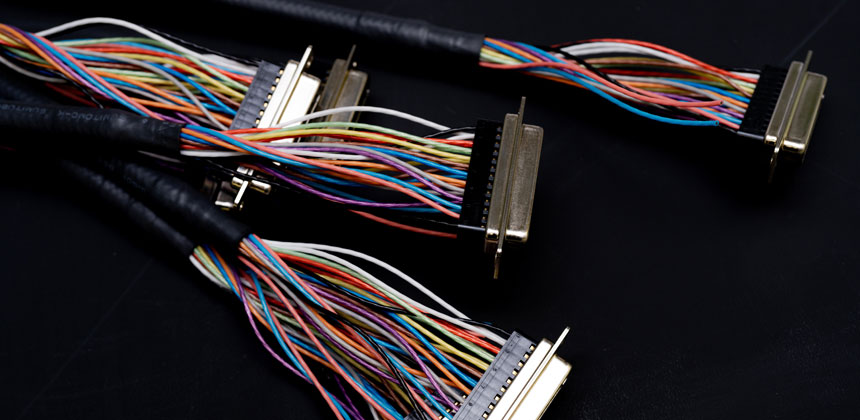
Why buy a pre-terminated assembly rather than terminate your own?
Because cables almost never fail in the middle. They fail at the ends — a crimp that wasn't fully closed, a solder joint that fatigued, a conductor that flexed against an unsupported connector shell until it broke. Termination is the most skill-dependent, least repeatable process in cable work, and a factory-made assembly moves it off your bench entirely: machine-crimped contacts, moulded strain relief that hand assembly can't reproduce, and electrical testing before the part ships. For an OEM or CEM building in any volume, that's not a convenience, it's a transfer of failure risk from your production line to the supplier's test rig.
Hand termination still has its place. Odd lengths, unusual pinout combinations, very low volumes where you already own the crimp tooling, or field repairs where waiting for a part isn't an option — all legitimate. But treat it as the exception, and when you do it, use the correct crimp tool for the contact rather than pliers and optimism. The crimps, splices and terminals range covers the contacts and tooling properly.
How do you specify a cable assembly? Work from the ends inwards
Start with the connectors. The connector at each end is a hard compatibility constraint — family, gender, pin count and keying must all match the mating device exactly. Common families include USB, M8/M12 circular, D-sub, IEC mains, XLR, RCA and wire-to-board housings. Everything else in the specification is negotiable; this isn't.
Then match the cable to the signal. Power assemblies need a voltage and continuous current rating with margin. Data and signal cables have their own vocabulary: characteristic impedance for RF (50Ω for most radio work, 75Ω for video), category rating for Ethernet, and balanced construction for professional audio. Buying a cable that physically fits but electrically doesn't — a 75Ω lead on a 50Ω antenna port — is the classic mistake here, because nothing obviously breaks; performance just quietly degrades.
Decide on screening. Unscreened cable is fine for power and slow signals in quiet environments. For data, audio, and anything routed near motors, drives or switching power supplies, screening is essential — both to keep interference out and to keep your own emissions in. If the equipment has to pass EMC testing, under-specified cables are one of the most common reasons it doesn't.
Check the environment. Temperature extremes, UV exposure, oils and coolants, washdown, continuous flexing on moving machinery — each rules out standard PVC-sheathed assemblies. Industrial applications typically want IP-rated connectors (M12 assemblies are commonly IP67 when mated) and sheaths chosen for the specific chemistry they'll meet.
Measure the route, not the distance. Assemblies aren't adjustable once terminated. The straight-line distance between two points has little to do with the length of a cable that must follow trunking, respect bend radii, and leave a service loop. Measure the actual path, add allowance, and confirm the minimum bend radius the cable sustains without mechanical fatigue or — for RF and data — signal degradation.
Confirm compliance last. UL listing, CE marking, RoHS and application-specific standards for medical, automotive or solar work can all constrain material and construction choices. Check them before ordering, not at the audit.
Which cable assembly type do you need?
Power is the simplest case. Power cable assemblies cover mains leads with IEC, kettle, cloverleaf and similar terminations — the spec that matters is the connector type and current rating. Photovoltaic installations are a special case with their own connector standard: solar power cables and leads use MC4-compatible terminations with UV- and weather-rated cable, because ordinary assemblies degrade quickly on a roof.
Data splits by protocol. USB cable assemblies span USB-A, B, Micro, Mini and USB-C across the 2.0 and 3.x generations — check the generation, not just the plug shape, since a 2.0 lead in a 3.x application silently caps your transfer rate. Network cable assemblies cover Ethernet patch leads by category rating and screening; computer cable assemblies handle DisplayPort, HDMI, VGA and other peripheral connections; and telephone and modem cables cover RJ11 and RJ45 line connections.
Signal work is where cable construction matters most. RF cable assemblies pair coaxial cable with SMA, BNC, N-type and similar connectors — impedance and loss per metre are the specs to check, and both matter more as frequency rises. Audio and video cable assemblies cover XLR, jack, RCA and HDMI for professional audio, broadcast and AV installation, where balanced, screened construction is what keeps hum out of long runs.
Industrial and internal wiring rounds out the range. Sensor and actuator cables with M8 and M12 circular connectors are the standard interconnect of factory automation — sealed, keyed, and available straight or right-angled for tight mounting. Inside equipment, wire-to-board cable assemblies link looms to PCBs through Molex-style, JST and similar housing systems, and ribbon and flat cable assemblies handle IDC-terminated board-to-board and panel connections where many parallel ways are needed in minimal space.
Quick reference: which assembly for which job?
| Application |
Assembly type |
Key spec to confirm |
| Mains power connection |
Power cable assembly |
IEC connector type; current rating; length |
| Device programming or data transfer |
USB cable assembly |
USB generation (2.0, 3.x); connector at each end |
| Patch panel or switch connection |
Network cable assembly |
Category (Cat5e/6/6a); shielded or unshielded; length |
| Antenna to radio module |
RF cable assembly |
Connector family; impedance (50Ω/75Ω); loss per metre |
| Professional audio signal routing |
Audio and video assembly |
Connector (XLR, TRS); balanced or unbalanced; screening |
| PLC to sensor on a machine |
Sensor and actuator cable |
M8 or M12; pin count; straight or right-angle; IP rating |
| Loom to PCB inside equipment |
Wire to board assembly |
Connector pitch; pin count; contact current rating |
| Internal drive or panel ribbon |
Ribbon cable assembly |
Number of ways; pitch; IDC connector type |
| Solar panel array interconnection |
Solar power cable |
MC4 compatibility; cross-section; UV/weather rating |
Which brands does Rapid stock?
For professional audio and AV, Neutrik — the industry's default for XLR and speakON — and REAN are both well represented. Siretta covers pre-terminated coaxial assemblies for RF and antenna work in a range of lengths and connector combinations. Industrial automation is served by Lumberg's M8 and M12 assemblies alongside Bulgin and EDAC, while Alpha Wire, Helukabel, LAPP and UniStrand cover wire-to-board and power needs. TruConnect provides competitively priced general-purpose assemblies across the common formats.
Ordering and despatch: high-volume lines across the range are ready to order, with same-day despatch on UK-stocked items and delivery within a week for extended-range stock. Specialist requirements — non-standard connector combinations or production quantities — fall outside standard stock; contact Rapid to discuss options.
Browse Rapid's full range of cable assemblies across power, USB, network, RF, audio, sensor and more.
Shop all cable assemblies
Frequently asked questions
What is the difference between a cable assembly and a wire harness?
A cable assembly is a self-contained, pre-terminated cable with connectors at one or both ends — a discrete part with its own part number. A wire harness is a more complex, multi-branch bundle of wiring routed and tied into a specific build, such as a vehicle or control panel, and is integrated rather than plug-and-play.
What is the difference between M8 and M12 connectors?
The number refers to the thread diameter in millimetres. M12 is the more common industrial standard, supporting more pins and higher current; M8 is the compact alternative for small sensors and tight spaces. Both are typically IP67-rated when correctly mated, and both appear across sensor and actuator cables.
What should I check when specifying an assembly for an industrial environment?
Connector type, pin count and keying at each end; voltage and current rating; screening if the cable runs near motors or drives; environmental resistance (temperature, oils, UV, washdown, flexing); routed length with bend radius allowance; and any compliance requirements such as UL, CE or RoHS.
How quickly can I get cable assemblies from Rapid?
UK-stocked items qualify for same-day despatch, and extended-range items are typically delivered within a week. Specialist assemblies — unusual connector combinations or higher production quantities — sit outside standard stock; contact Rapid to discuss despatch options for these.
Related categories
Cables and wires ·
Cable accessories ·
Connectors ·
Crimps, splices and terminals ·
Heat shrink tubing ·
Sleeving


 {{SessionBasket.ItemCount }}
